

A practical author setup guide
Manage your SSL author workspace through ChatGPT.
The Short Story Lovers ChatGPT plugin is live. You write the stories; ChatGPT helps with the publishing work. It can add your completed chapters, organize story details, suggest categories and tags, manage drafts in 54 supported languages, check publishing or free-review readiness, update your Author Site, review privacy-minimized feedback, manage notifications, and request SSL support. Publishing still requires SSL checks and your confirmation.

Before you start
- You need a Short Story Lovers author account and a ChatGPT account that can use plugins. Availability can vary by plan, region, workspace policy, role, and whether the feature is supported on the ChatGPT surface you are using.
- Use the same Short Story Lovers account that owns the stories you want to manage.
- OpenAI’s current plugin guidance says that installing a plugin does not bypass app authorization or workspace permissions. Read the plugin details and the requested access before continuing.
For current platform terminology and availability, see OpenAI’s official Plugins in ChatGPT help article.
Start here
Install and connect your account
Use these three screens to connect safely, then start a conversation with the plugin.
Step 1
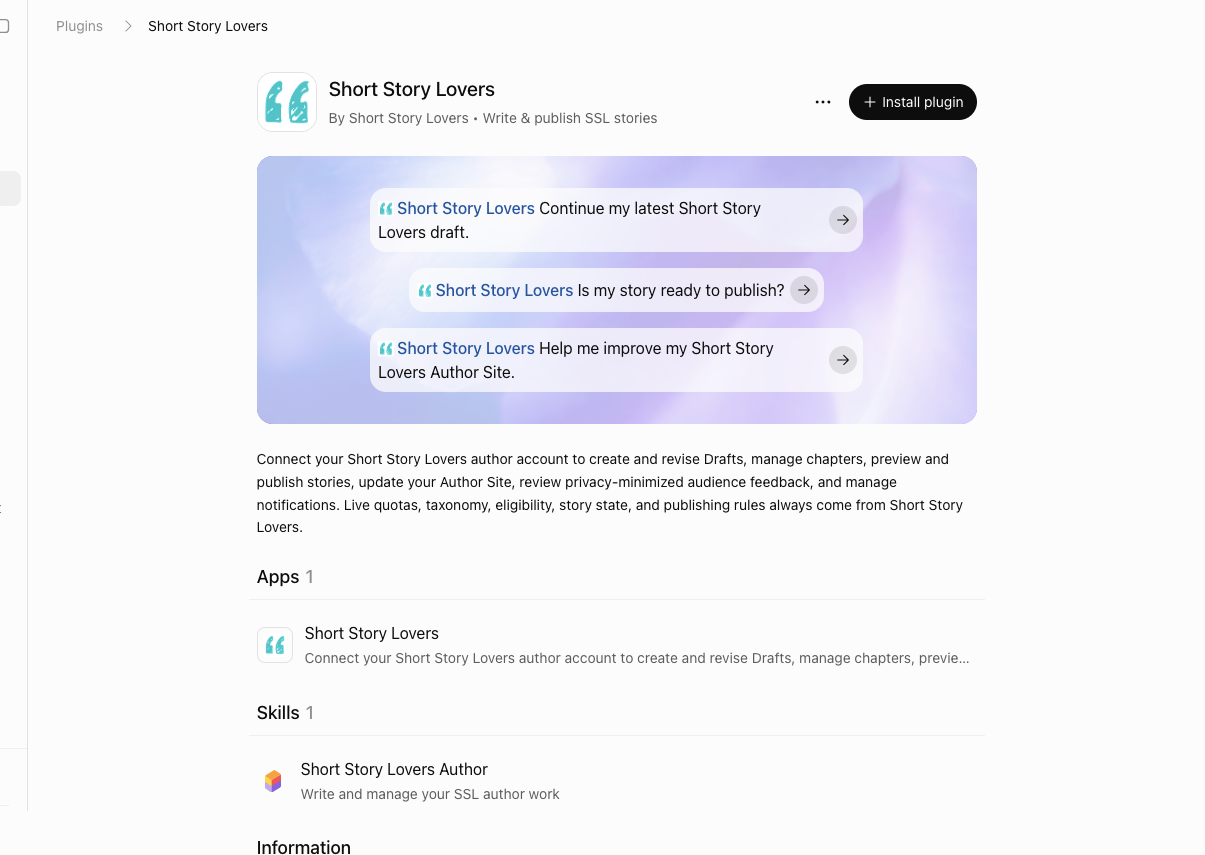
Install the plugin
Open the Short Story Lovers plugin link. If the link is not available in your ChatGPT surface, open the Plugins or plugin directory area and search for Short Story Lovers. Choose the install or add option shown by ChatGPT; exact navigation can differ by plan, region, workspace, and product surface.
Step 2
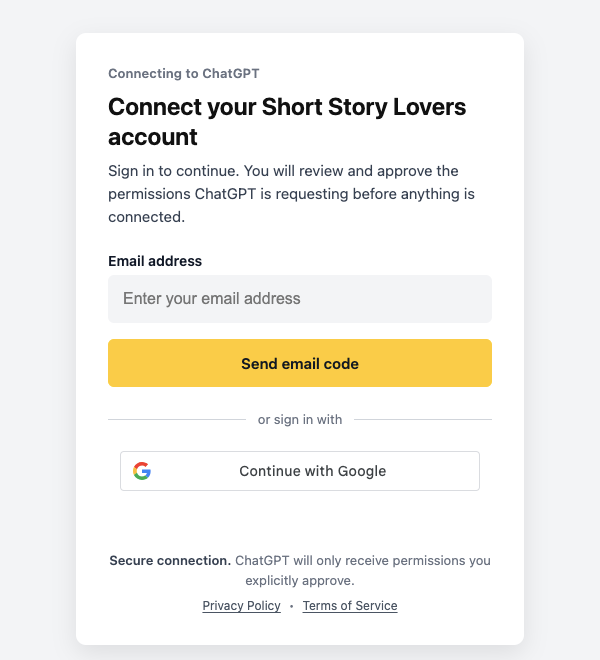
Connect your SSL author account
When prompted, continue to Short Story Lovers. If you are already signed in to your SSL author account in that browser, you may be taken straight to the permission review screen. Otherwise, complete sign-in with the email code or Google option offered on the SSL connection page. A new ChatGPT account still needs its own permission approval; do not share SSL credentials in chat.
Step 3
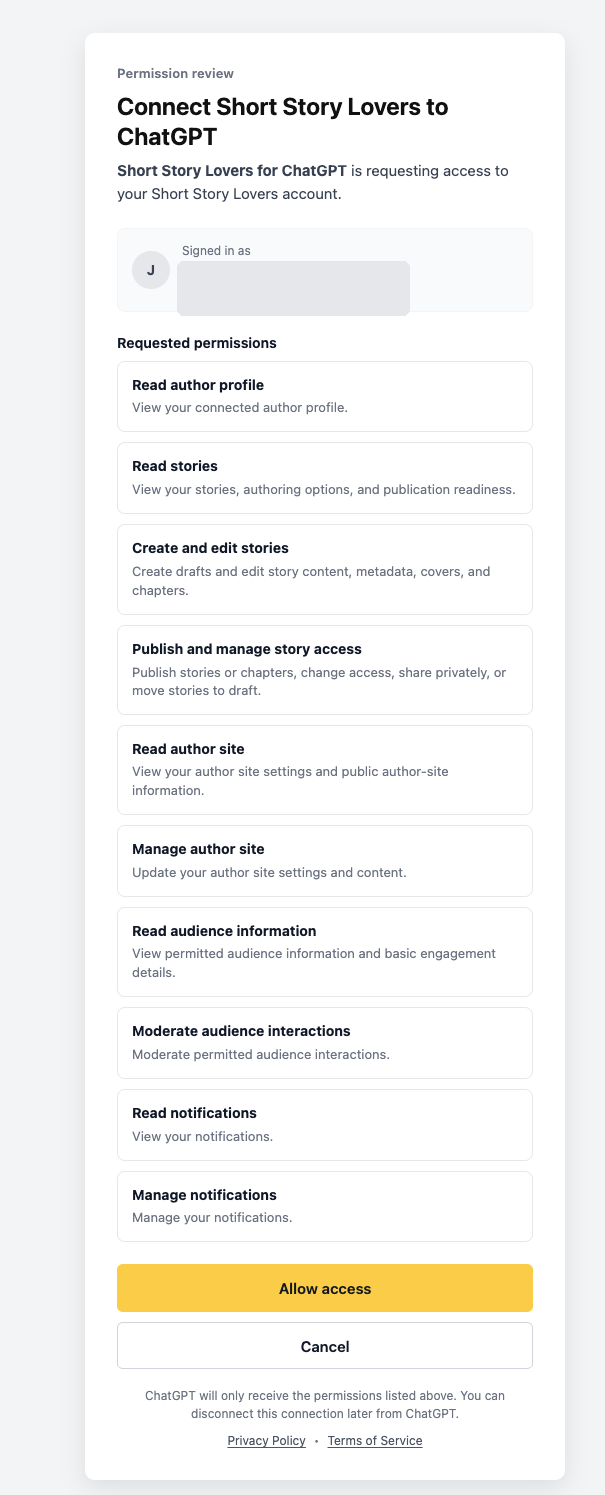
Review access permissions
Review the permissions requested. Approve only the permissions you understand and need for the author task. The plugin cannot grant itself access beyond the authorization and Short Story Lovers account it receives.
Step 4
Start a conversation
After approval, return to ChatGPT and start a new conversation. Mention the plugin with @ or select it from the Tools/Plugins picker where that control is available.
Safety reminder: Do not put your Short Story Lovers password, email codes, OAuth tokens, or other credentials in a ChatGPT message.
Your first conversation
Useful prompts
Copy one of these prompts into a chat after connecting your account. Replace the bracketed text with your own details.
Find and organize your work
Find: Show my latest Short Story Lovers draft and give me the edit and preview links.
Add my manuscript: I have written a standalone story titled “[Title]”. Add the exact text I provide to my SSL account as an unpublished draft. Do not generate or change the story text.
Story details: Review the existing description, category, subcategory and tags for “[Story title]”. Suggest suitable changes and ask me before saving them.
Preview and chapters
Preview: Show me the Short Story Lovers preview for “[Story title]”.
Chapters: List the chapters in “[Story title]”, then add my already-written “[Chapter title]” using exactly the text I provide. Save it as a draft; do not publish.
Cover: I have approved this image as the cover for “[Story title]”. Set it as the story cover. The cover action needs an image supplied in the supported ChatGPT flow and your approval immediately before it is used.
Check before publishing
Readiness: Check whether “[Story title]” is ready to publish publicly. Explain any blockers and ask me before publishing.
Confirmation: Publish “[Story title]” publicly only after you show the final readiness result and I explicitly confirm.
Stay connected to your audience
Feedback: Summarize the privacy-minimized reader feedback for “[Story title]” without exposing commenter identity.
Author Site: Show my Author Site headline and About text, suggest improvements, and save them only after I approve the final copy.
Notifications: Show my new Short Story Lovers notifications and tell me which supported notification preferences I can change.
Contact support: Help me write a support request about [issue]. Show me the full message and ask for approval before submitting it to SSL.
Now available through ChatGPT
Manage and submit stories in your language
The plugin helps manage your own stories in SSL's 54 supported languages, including Hindi, Spanish, Urdu, French and Bengali. You provide the manuscript and select its language. The plugin does not automatically translate, generate or silently change the language of your writing.
What happens when you submit?
Adding your own manuscript or updating its details through ChatGPT saves a draft, not a public story. When you explicitly confirm submission of an eligible public non-English story, SSL sends it through its free multilingual review process. No Pro Author membership is needed for this review. Some stories qualify for automatic publication after the checks; others need further review. A story marked Under Review is not yet published.
SSL may return Published, Changes Needed or Rejected after review. Follow the decision and the instructions in your SSL account or email. Eligible new chapters in an already-published non-English multi-chapter story also follow the free chapter-review path. Private-story rules and normal English publishing eligibility remain unchanged.
Add your completed Hindi story
I have written a Hindi story titled "[Title]". Add the exact manuscript I provide to Short Story Lovers without rewriting it. Save it as an unpublished draft.
Check a Spanish story before review
Check whether my Spanish story "[Title]" is ready for free public review. Explain any blockers, and ask me before submitting it.
Learn more in Write in Your Language and Understanding Multilingual Story Review.
What needs your explicit confirmation
The plugin can help save your own manuscripts, add finished chapters, and organize story details. It must pause for your explicit confirmation immediately before consequential actions such as publishing or changing a story’s public, private, or subscriber-only state, removing an eligible chapter, hiding a reader comment, or making an approved Author Site change. Check the returned result and URL after any action; do not assume an action happened if ChatGPT reports an error or asks you to retry.
Plans, eligibility, and boundaries
Short Story Lovers remains authoritative for your plan, quotas, story ownership, taxonomy, chapter rules, private-story allowance, subscriber-only eligibility, and publication readiness. The plugin cannot promise that an action is available for every account. Eligible public non-English submissions and eligible non-English multi-chapter continuation use free review and do not consume English public-story allowances. English multi-chapter publishing and subscriber-only options still follow their relevant Pro Author or other SSL eligibility rules. Private-story rules are unchanged.
The plugin does not buy or change plans, spend TRP or SSL credits, purchase featuring, process payouts, change bank details, change login or account-security details, delete your account, bulk-message readers, provide rich analytics, manage Books Showcase, or perform arbitrary admin actions. It cannot post a new comment on another author’s story, and it cannot expose commenter or subscriber identity. It manages only the connected author’s permitted work.
Privacy and account safety
- Connect only your own Short Story Lovers account and review the OAuth permissions before approving.
- Share only the story text or image you intend to use. Do not paste passwords, email codes, tokens, bank information, or private administrative data into chat.
- Use the plugin only for work you own or are authorized to manage. Reader feedback is summarized with privacy-minimized information.
- When you finish, remove or disconnect the plugin from your ChatGPT plugin/app settings or from the connected-account controls provided by Short Story Lovers. Revoke access if you no longer want the connection.
Troubleshooting
You cannot find the plugin: Check the direct link, the plugin directory, your ChatGPT plan, region, workspace policy, role, and whether the plugin is available on your current surface.
Connection or permission error: If you are already signed in to SSL, the permission screen may open directly. Otherwise, use the official SSL sign-in page. Reopen the plugin details if the connection fails, and approve only the permissions you understand. Ask your workspace administrator if its policy blocks access.
A story or action is missing: Confirm that you connected the author account that owns the story. The plugin cannot bypass plan, quota, ownership, readiness, or eligibility rules.
A save or publish result is unclear: Do not repeat a consequential action blindly. Check Short Story Lovers directly and use the canonical URL returned by the plugin, or contact Short Story Lovers support.
Frequently asked questions
Does installing the plugin publish my stories?
No. Adding your own story text, chapters or details saves a Draft first. Publishing and other consequential story-state changes require the current readiness check and your explicit confirmation.
Are non-English stories published immediately?
Not necessarily. After you confirm a public submission, SSL checks the story through its free multilingual review process. Some are approved automatically, while others wait for review. Under Review does not mean Published.
Which Short Story Lovers account should I connect?
Connect the author account that owns the stories you want to manage. The plugin uses the connected account’s real ownership, plan, quotas, and eligibility.
Can I disconnect later?
Yes. Remove or disconnect the plugin from your ChatGPT plugin/app settings or the connected-account controls provided by Short Story Lovers, and revoke access if you no longer want the connection.
Ready to connect your writing workspace?
Install the plugin, review the requested access, and keep the author-controlled confirmation boundary in place for consequential actions.